What you get back
- The conversions your page sends
- Every Google Ads conversion on the page and in your Tag Manager containers, with its trigger written out in plain English.
- Tracking that's broken
- Conversions firing on page load, click IDs lost in redirects, no Conversion Linker, no Consent Mode, untracked phone calls and duplicate tags.
- Landing page problems
- No call to action in the first screen, long forms, popups, no privacy policy, keyword mismatch, title and meta tags.
- Real-user speed
- Google's Core Web Vitals for your page or site, plus our own test on a simulated 4G phone.
| Sent to | Page loads | Phone tapped |
|---|---|---|
AW-123456789 | Conversion AbCdEfGhIjK page_view | nothing |
G-AB12CD34EF | page_view | nothing |
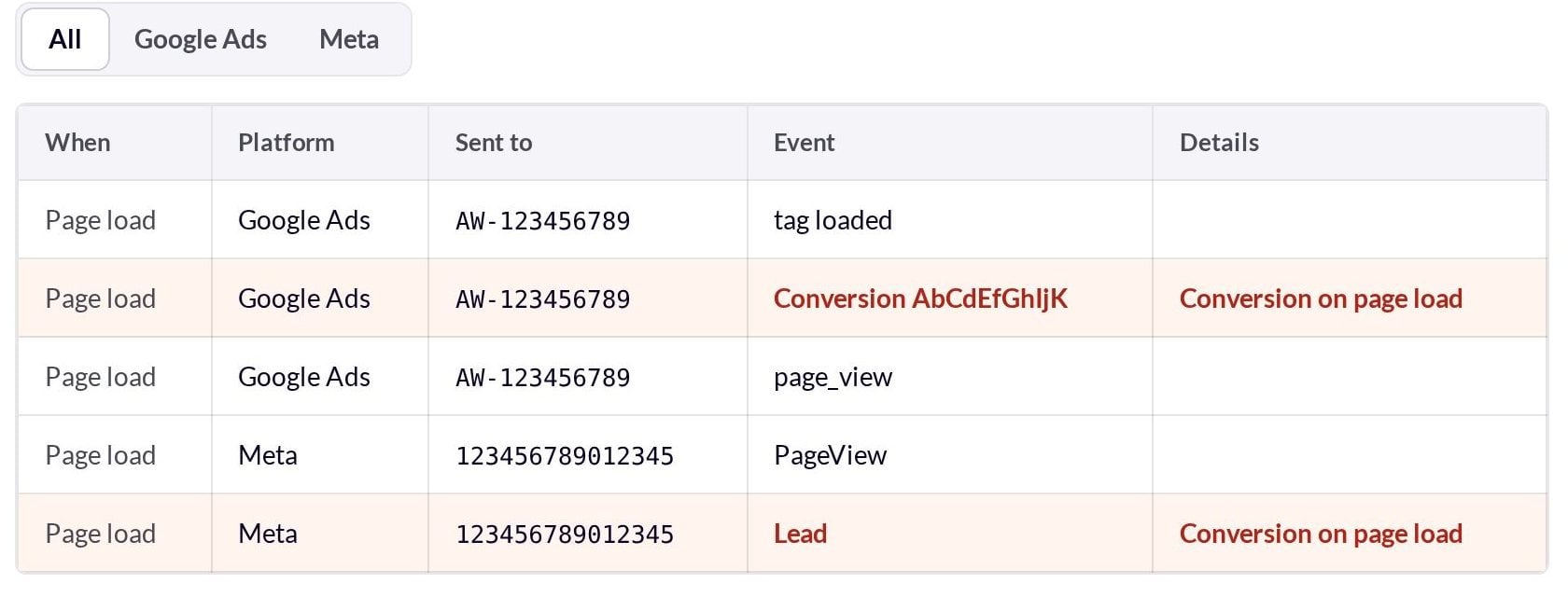
A conversion on page load means every ad click is counted as a lead.
What the report looks like
Every problem comes with what we saw, why it costs you money and how to fix it. This is a real report on our deliberately broken test page.

Three tracking mistakes that quietly waste ad spend
None of these show up as an error in Google Ads. The account looks healthy while the bidding learns from bad data.
-
Hit log
AW-123456789/AbCdEfGhIjKConversion fired on page loadA conversion fires when the page loads
Every ad click is counted as a lead. Your cost per conversion looks cheap, and Smart Bidding learns to buy more clicks instead of more customers.
-
Redirects
/offer/?gclid=Cj0K... → 301 → /offer/Click ID droppedA redirect strips the click ID
Without the gclid, Google can’t match a lead back to the click that caused it. Conversions go missing and the campaigns that work look like they don’t.
-
Meta Pixel
fbq('track', 'Lead')Sent on page load, no _fbc cookieThe Meta Pixel sends Lead to every visitor
Facebook optimises for people who land, not people who enquire, and without the _fbc cookie the conversions it does get are matched badly.
How the audit works
- You paste the ad’s final URL. Add the keyword you bid on if you want a message match check.
- A test phone opens it like an ad click. Test Google and Facebook click IDs and UTM tags go in the URL, on a simulated 4G connection.
- We scroll, then tap your phone number. Every hit to Google Ads, GA4, Meta and other ad platforms is recorded at each step.
- We read your Tag Manager container. That catches a conversion set to fire on every page view even when a consent banner held it back during the test.
Every tracking hit is answered by our test browser and never reaches Google or Meta, so the audit adds no fake visits or conversions to your accounts.
Tag Assistant, Pixel Helper or this audit?
Google and Meta’s own tools are good for debugging one hit at a time. This audit answers the bigger question: is the page sending the right conversions at the right time?
| This audit | Google Tag Assistant | Meta Pixel Helper | |
|---|---|---|---|
| Needs a browser extension | No, just the URL | Yes | Yes |
| Google Ads and Meta in one report | Yes | Google only | Meta only |
| Reads Tag Manager triggers in plain English | Yes | Shows tags that fired | No |
| Follows redirects to check the click ID survives | Yes | No | No |
| Landing page, HSTS and speed checks | Yes | No | No |
| A link you can send your developer | Yes | No | No |
Everything we check
- Google Ads
- Every conversion on the page and in Tag Manager with its trigger, conversions on page load, gclid storage, Conversion Linker, Consent Mode v2, enhanced conversions, call tracking, values and duplicate tags.
- Meta Pixel
- Pixel IDs, PageView, Lead or Purchase on page load, phone taps, the _fbc click cookie and advanced matching.
- Landing page
- Call to action in the first screen, form length, popups, phone links, reviews, privacy policy, keyword match, HTTPS and HSTS.
- SEO and sharing
- Title, meta description, a Google result preview and the share card Facebook, LinkedIn and WhatsApp will show.
- Speed
- Google’s real-user Core Web Vitals for the page or site, plus our own load on a mid-range phone.
Questions
- Can you see my conversion names?
- No. The page only holds the account ID and a conversion label, such as AW-123456789/AbC-dEfGh. Match the label to a conversion action in Google Ads under Goals, Conversions.
- Do you need access to my ad accounts?
- No. Everything comes from what your page and Tag Manager publish to every visitor. Imported GA4 conversions, offline conversions and Meta’s Conversions API aren’t visible from the page.
- Should I audit my thank-you page too?
- Yes, if that’s where your lead or purchase fires. On a thank-you page a conversion on load is correct. On the page your ads point to, it isn’t.
More free tools
- WordPress Speed TestA real-browser test from 18 locations, with WordPress-specific fixes.
- Core Web Vitals ReportGoogle’s real-user data for your site, with optional weekly emails.
- Free SEO AuditA technical SEO check of any page in seconds.