
One issue we see again and again in our SEO audits is sites with content that is out of date, often years out of date. Google likes fresh content and old content can be actively hurting your site. As soon as the clock ticks over to the new year, anything on your site dated for the previous year starts to slip, so the start of the year is the time to audit it.
Why dated content drops off
We see this type of issue most commonly with affiliate and content sites that have a lot of “best of” posts which are typically dated for that year, for example “Best Travel Backpacks for 2024” like the screenshot below.
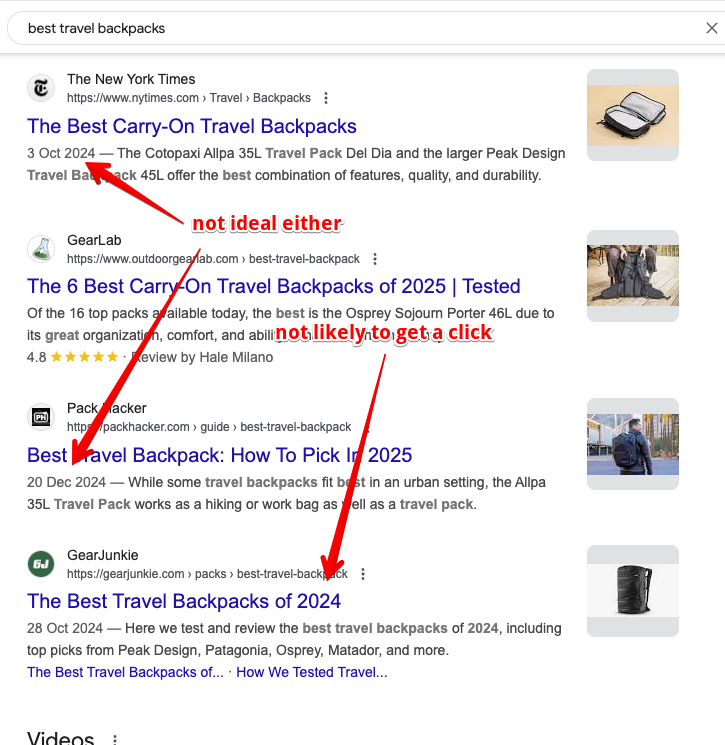
Once the new year arrives, Google will start to de-rank this content because users are less likely to click on posts dated for last year, even if they do show up in the search results. Dates are an important part of Google’s algorithm and are heavily relied upon by ChatGPT and other LLMs too, so content with last year’s date in it will see a drop off both in rankings and in click through rate as searchers click on newer dated content instead.
You can also see in the screenshot that some of the posts have a title tag with the new year in it but the post date is still the old year, which again is not ideal.
It is not just affiliate sites. On other types of sites we will often see news posts or updates that are years out of date and completely irrelevant still live on the site, which is again harmful for SEO. Sites that run events or publish content tied to specific dates have the same problem.
How to find it in five minutes
A simple way to audit for this type of content is to use Google search itself by running the search:
“2024” site:domain.com
Swap in whichever year has just finished and your own domain. For the example in the screenshot that would be:
“2024” site:gearjunkie.com
This will return all the posts with that year in them.
If you have a bigger site or want to take this to the next level, Screaming Frog SEO Spider and its custom search function will crawl your site and look for the strings you tell it to search for, for example last year’s date in SEO title tags. Detailed instructions for that are here.
What to do with each post
For content you want to keep, the date will need to be updated in several places: the title tag, the h1 heading tag and the content itself. For highly competitive content it may also be worth updating the publish date so old dates are not showing in the search results like the screenshot above.
For obsolete and old content, most often the solution is to just delete it and let it 404 out. In some cases, if the post is still getting traffic, redirecting it to another relevant post may be a better option.
This is a quick job for most sites and it is one of the few SEO tasks where the deadline is fixed. Put it in the calendar for the first week of every year and you will stop handing rankings to competitors who simply have a newer date on the page.
This article was first sent to the WP Speed Fix email list. Subscribe here to get future articles by email.