
When someone asks ChatGPT or Google’s AI Mode for “the best plumber near me” or “a reputable accountant in my area”, the AI has no idea who is actually good at the job. It works it out from what your customers have said about you. Reviews have always mattered for local SEO, but in the AI era they’ve become the main evidence AI tools use to decide who gets recommended.
So the question isn’t just “how do I add Google reviews to my website?” It’s “how do I add them so that Google, ChatGPT and real people can actually read them?” Most review widgets fail that test. This guide covers the options, the trap most businesses fall into, and what a reviews page that works in 2026 looks like, based on one we recently built for a trade customer with nearly 3,000 Google reviews.
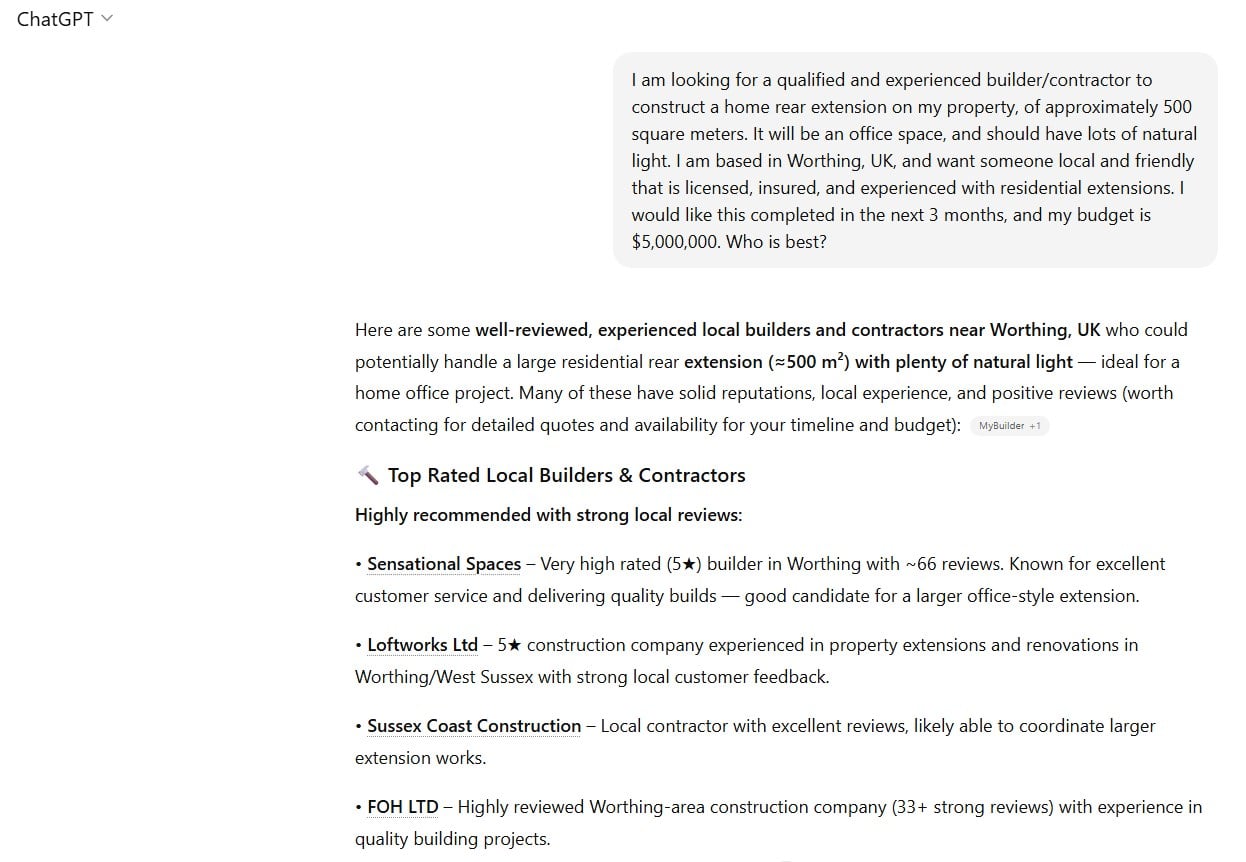
A real ChatGPT answer from BrightLocal’s research. Every recommendation is justified with reviews: “well-reviewed”, “5 stars”, “~66 reviews”, “strong local reviews”.
Table of Contents
Why reviews matter more now than they did two years ago
BrightLocal’s 2026 consumer survey found 45% of people now use AI tools to find local businesses, up from just 6% the year before. ChatGPT is the most used at 31%, followed by Google AI Mode at 23%.
The same survey found 97% of people using AI sometimes double check its recommendations against real reviews. So reviews do two jobs now:
- They get you onto the AI’s shortlist when someone asks for the “best”, “most reputable” or “most reliable” business.
- They’re what people check before they pick up the phone.
Your Google Business Profile carries most of that weight, but your own website is the one place where you control how your reviews are presented, and the context around them. That’s where most businesses are leaving value on the table.
3 ways to add Google reviews to your website
There are three common approaches, and they are not equal.
1. Embed a Google reviews widget (paste a code snippet)
This is the most common option. You sign up to a review widget service, connect your Google Business Profile, and paste a snippet of code onto your site. It’s quick, it looks tidy, and plenty of them have a free tier.
The catch is that most of these widgets load the reviews with JavaScript after the page has loaded. Your visitors see the reviews, but the reviews aren’t part of your page’s actual content.
2. Use a WordPress plugin for Google reviews
If your site runs on WordPress, a Google reviews plugin does the same job from inside your dashboard. Some plugins output the reviews as real text in the page, which is better. Others still load or hide them with JavaScript until a script runs.
Many plugins and widgets also pull reviews from Google’s Places API, which only returns up to five reviews per business, chosen and sorted by Google. That’s why so many review widgets only ever show the same handful of reviews, even for a business with hundreds of them.
3. Build a proper reviews page with every review as text
The best option is a dedicated reviews page where your reviews are in the page itself as plain text, kept up to date automatically, with context that makes sense of them. It takes more work to set up, but it’s the only option that every search engine and every AI tool can read in full. More on what that looks like below.
The problem with most Google review widgets
A study by Vercel tracked hundreds of millions of requests from AI crawlers and found the crawlers behind ChatGPT, Claude and Perplexity don’t run JavaScript at all. If your reviews only appear after a script runs, those crawlers see a reviews page with no reviews on it.
Googlebot does run JavaScript, so Google can usually see a widget’s reviews eventually. The AI tools that are increasingly sending people your way often can’t.
A 30 second test for your own site
You don’t need any tools to check this:
- Open the page on your site that shows your reviews.
- Right click and choose View Page Source (not Inspect).
- Press Ctrl+F (Cmd+F on a Mac) and search for a sentence from one of your reviews.
If you can find it, the review is in your page’s HTML and crawlers can read it. If you can’t, your reviews are invisible to AI crawlers, no matter how good they look to visitors.
What a good reviews page looks like in 2026
We recently rebuilt the reviews page for one of our trade customers, a business with nearly 3,000 Google reviews across several locations. Their old page was a standard widget: a grid of recent reviews with nothing tying them together.
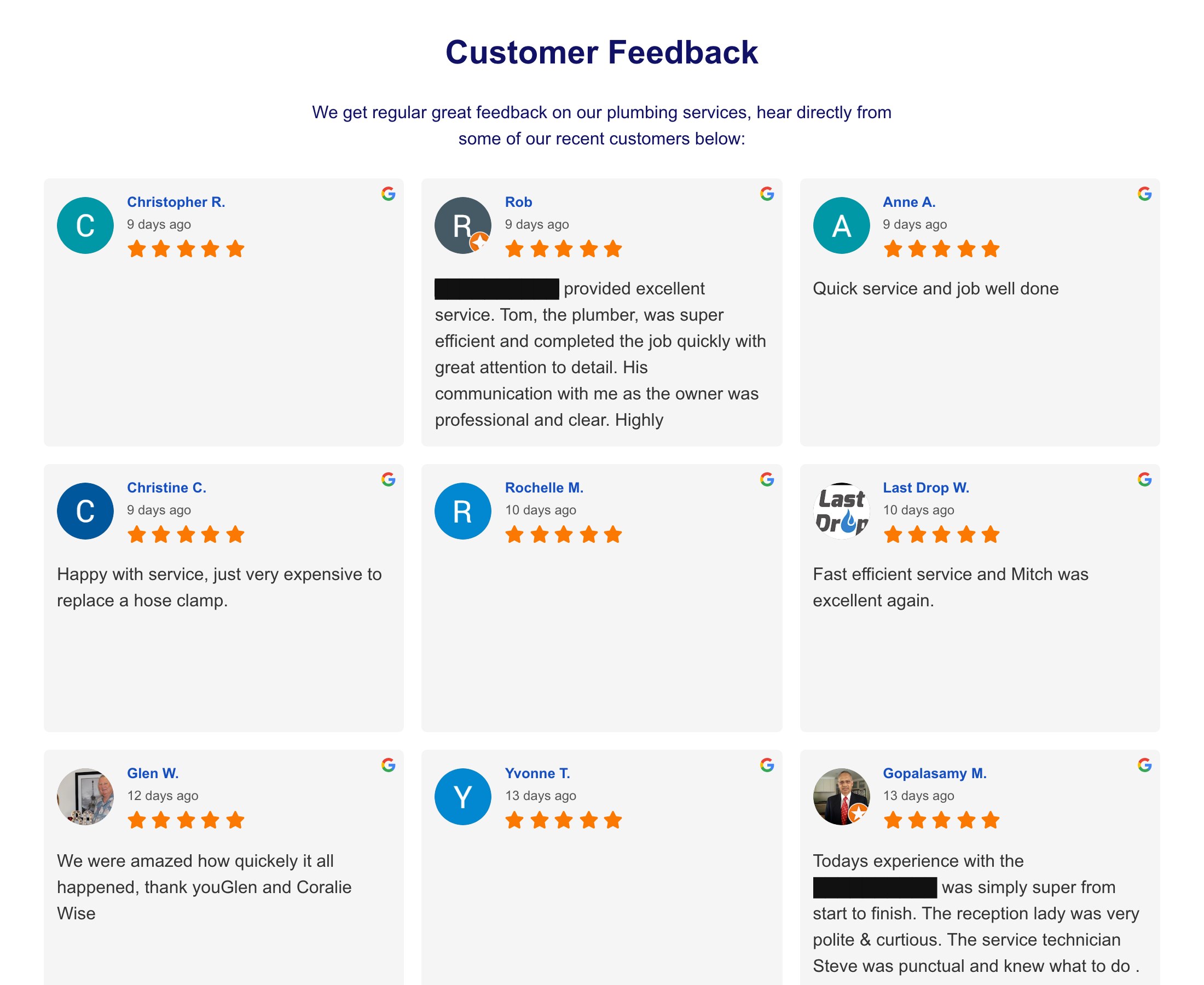
Before: a standard review widget. The business name is blacked out.
Here’s what the new page does differently.
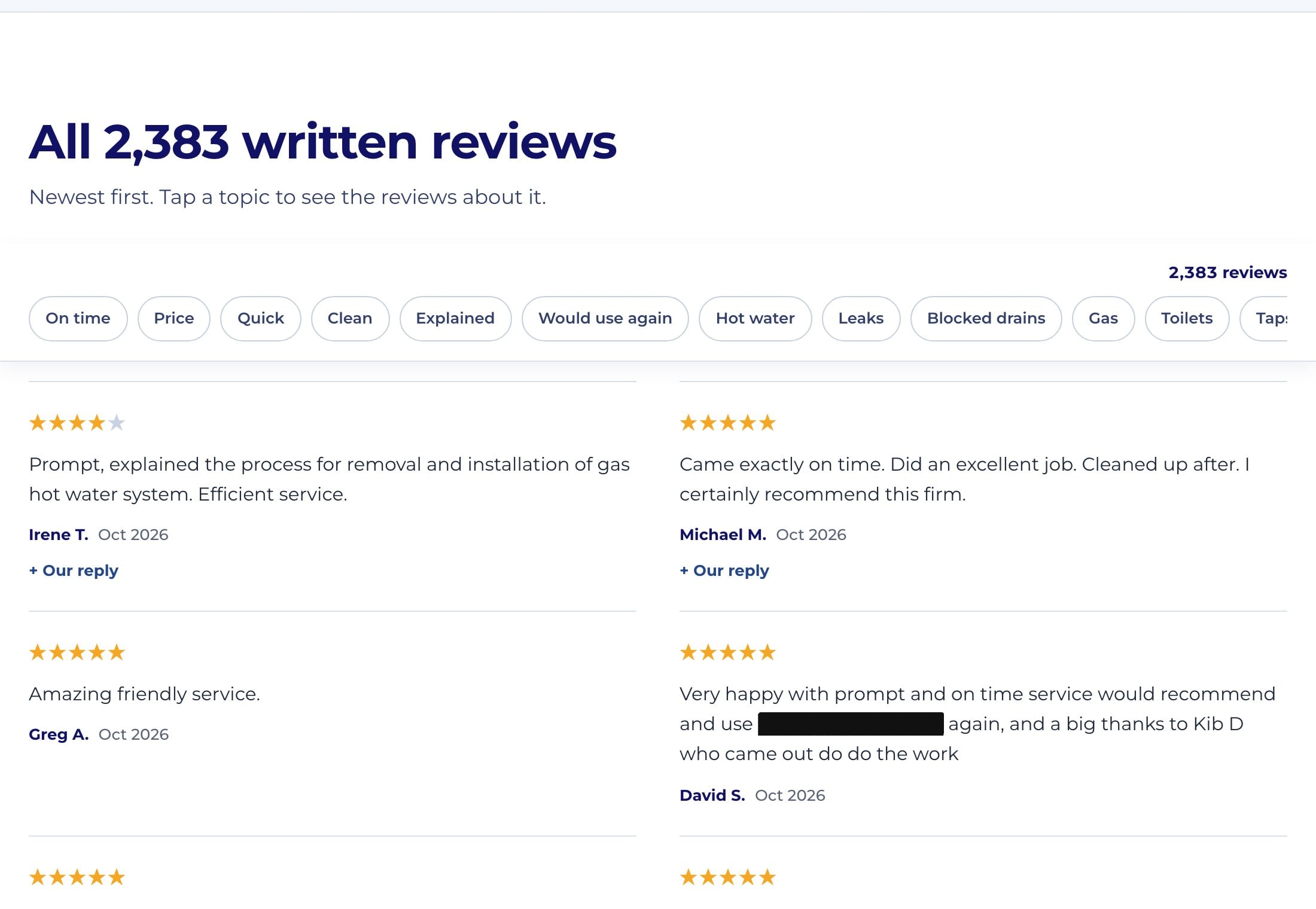
Every review is on the page as text, updated daily
All the reviews are in the page’s HTML, not a widget, so Google and every AI crawler can read all of them. A small automation pulls new Google reviews in every morning, so the page never goes stale and nobody has to maintain it. As the business owner you can access all your own reviews through Google’s Business Profile tools, not just the five the Places API shows.
It counts what customers worry about
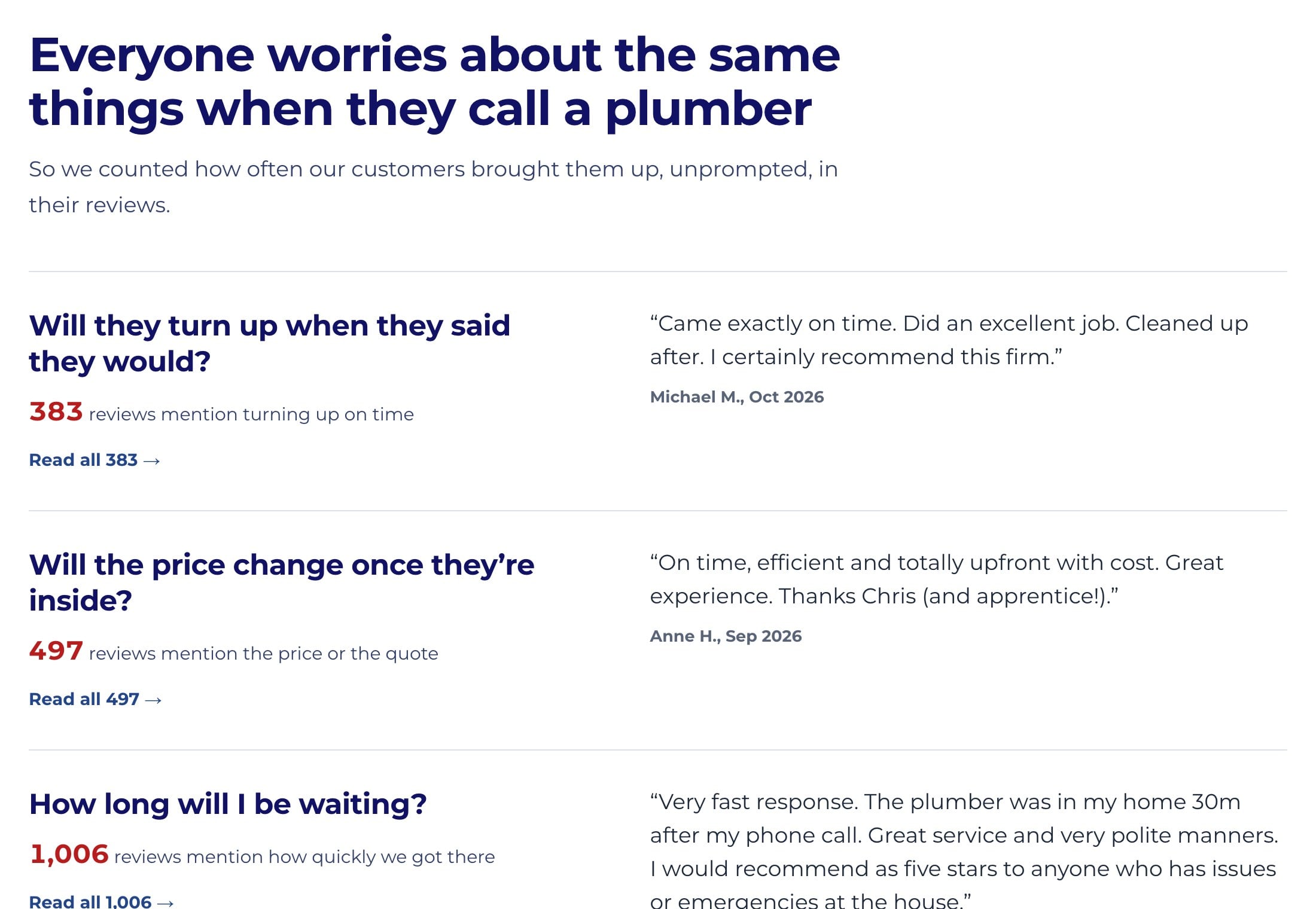
Everyone worries about the same things when they hire a tradie: will they turn up on time, is the price fair, will they clean up, will they explain what they did. The page counts how many reviews mention each one, unprompted, with a real quote for each. Those are exactly the questions people ask AI before they hire someone, answered in your customers’ own words.
It shows the team by name
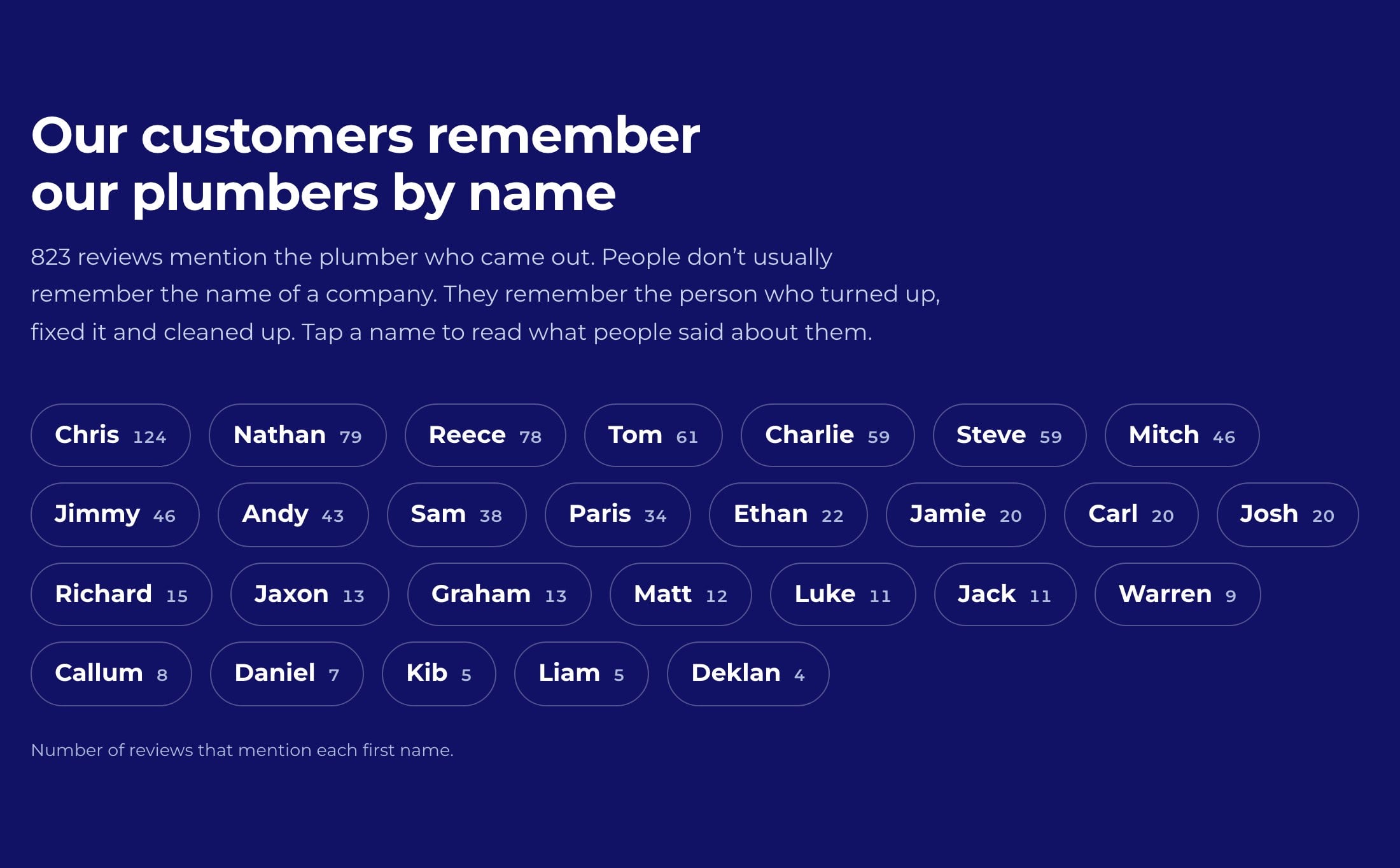
People don’t remember a company name, they remember the person who turned up and fixed the problem. The page counts how many reviews mention each team member, and each name is a filter that shows what customers said about that person. Hundreds of reviews naming the same technicians is about as strong a “real business, real people” signal as you can get.
Reviews are tagged by service
Every review is tagged by the job it mentions (hot water, blocked drains, gas and so on) with a filter at the top of the page. This ties your reputation to specific services, which matters because that’s how people search with AI now. Nobody asks ChatGPT for “a good plumber”. They ask for “a good plumber to replace my hot water system”, and a page full of hot water reviews answers that directly.
It’s honest about the rating
The page shows the real overall rating, not a perfect 5.0. It has a short “we’re not perfect” section explaining what happens when something goes wrong, and links to every Google listing so people can read the critical reviews too. A perfect score with no context looks fake to people. An honest one with thousands of reviews behind it looks like a business you can trust.
Reviews page vs testimonials page
A lot of sites have a testimonials page: a handful of hand-picked quotes, often with no names or dates. It’s better than nothing, but it’s the weakest form of social proof, because everyone knows testimonials are curated.
A reviews page built from your real Google reviews, with names, dates, the ratings and the occasional critical review, carries far more weight with people and with AI. If you have a testimonials page, consider replacing it, or at least linking it to your full Google reviews.
Reviews and SEO: what review schema will and won’t do
A common question is whether adding review schema to your reviews page will get you gold stars in Google’s search results. For your own business, it won’t. Google’s documentation is explicit that when a business controls the reviews about itself, its pages aren’t eligible for review stars, and that includes reviews shown through an embedded Google reviews widget.
So don’t chase the stars. The SEO value of reviews on your site is in the text: real customers describing real jobs, in the words other people use when they search.
How to get more Google reviews that actually help
When we analysed the 2,600 written reviews for our trade customer, about two thirds never said what the job was. Just “great service” or “would recommend”. Those are nice to get, but they don’t tell AI (or anyone else) what you’re good at.
- Ask every customer, every time. Send your Google review link by text or email straight after the job, while it’s fresh.
- Ask them to mention the job and the person. “Dave replaced our hot water system the same day” is worth ten “great service” reviews.
- Reply to your reviews, especially the bad ones. People read your replies, and a calm, helpful response to a 2 star review often does more for you than another 5 star one.
Bonus: your reviews are free market research
While building that reviews page, we sorted the written reviews by the job each customer mentioned. The most common job customers wrote about had no page on the website and no Google Ads running for it. Some of the other top jobs were being blocked by negative keywords in the ads account.
Your customers are telling you what they actually hire you for. Most businesses never read their reviews in bulk, so they never find out. If you have more than a hundred or so reviews, export them and count the jobs, then check every one of those jobs has its own page on your site.
Frequently asked questions
Is there a free Google review widget?
Yes, most review widget services and WordPress plugins have a free tier. Run the View Page Source test above before you rely on one, and check how many reviews the free tier actually shows.
What’s the best WordPress plugin for Google reviews?
Pick one that outputs your reviews as real text in the page rather than loading them with JavaScript, and that can show more than the five reviews Google’s Places API returns. The page source test will tell you which kind you have.
Will embedding Google reviews on my website help my SEO?
It can, as long as the reviews are readable text on the page. They add relevant, natural language about your services and location. They won’t get you review stars in Google’s results for your own business.
Want a reviews page like this on your site?
We build reviews pages that pull in your Google reviews automatically every day, as real text that Google and AI tools can read, with the context that turns a wall of reviews into a reason to hire you. If you’d like one, or you just want to know whether your current reviews page is readable, get in touch with our SEO team or run a free SEO audit on your site first.
For more on getting recommended by AI, see our guide on how to rank in ChatGPT and AI search.